Tokens cost too much.
Frontier tokens are priced for data centres. On the mesh the heavy lifting runs on compute you already own, and the tokens your machines earn pay for the rest. Only the manager's tokens stay premium.
See the savingsDevSpanner turns the computers you already own into a peer-to-peer AI network. Your machines seed the mesh overnight on cheap, green power and earn tokens. By day you spend them on a blend of frontier, open-weight and categorisation models, always optimised for the best value for your work, with a console that shows exactly what happened.
The question we get asked most, answered in six steps. The mesh is a peer-to-peer network of members' own machines. Nobody rents a data centre; everybody brings the hardware they already have.
Mac, PC, Linux box, home server. They all join one account, so the laptop you work on and the desktop in the spare room are one fleet.
Overnight by default, or your off-peak tariff hours. Battery, thermal and CPU or GPU limits per machine. Jobs run in a sandbox with no access to your files and stop the moment you touch the keyboard.
No single machine holds a whole model. Open-weight models are split into layer blocks across peers in the same region, so a 70B model runs on eight machines that each hold a slice. Your machines host their blocks and run other members' tasks while power is cheap and the grid is quiet. Frontier models stay on hosted lanes through the gateway.
Every job earns mesh tokens weighted by the work done and the demand at the time. Every machine on the account pays into one wallet. Tokens are compute credits, not a currency.
Quick tasks on fast lanes when you need an answer now. Bigger projects on the mesh, overnight, at half rate. The scheduler blends frontier, open-weight and categorisation models per task, always optimising for the best value for your work.
The routing trace shows the lane, the tokens, the hand-offs and the savings for every job. Nothing is hidden behind a spinner, and nothing runs on your machine that you didn't allow.
Shared jobs run in an isolated sandbox with no access to your files, your network or your accounts, inside the limits you set. Sharing is opt-in per machine and stops the moment you use it. Sensitive work of your own can be pinned to your own fleet and never leaves it.
No. Any machine earns something; a GPU desktop or a home server earns a lot more, because tokens follow the work done. You can also use the console without sharing at all, on the subscription you already have.
Sharing is scheduled into your off-peak hours by default, and tariff-aware scheduling can follow your tariff exactly. You set the hours and the limits, and the tokens reflect the value of the work, so a machine that shares overnight is earning at the cheapest hours it has.
No. Mesh tokens are compute credits on the GoLLeM Mesh, earned by serving work and spent on running it. They are not a currency and are not traded.
Yes. You share hardware you own, the mesh runs open-weight models under their own licences, and frontier lanes run through the providers' official APIs. Nothing is copied that isn't licensed to be.
You can still use DevSpanner as a console on frontier lanes, and buy tokens for mesh lanes when you want the cheaper, slower option.
LimeWire, the file-sharing app a lot of us grew up with, wasn't shut down because peer-to-peer sharing is illegal. In 2010 a US court found the company liable for encouraging its users to share pirated music, and it closed that year. Peer-to-peer sharing itself carried on and is everywhere today, from Linux downloads to game updates. What matters is what gets shared. The mesh shares spare compute, runs only models whose licences allow it, and never passes one member's paid access to another.
Not as an offset or a pledge, but as how the network is designed. Overnight projects already wait for your off-peak window, and when sharing opens, peers will seed in their own local night. Because the mesh follows the moon around the world, somewhere will always be in its cheap, quiet hours.
The overnight service class already runs your projects in your off-peak window, at half rate. When sharing opens, contributed peers will seed in their own local night too.
betaFive regions, each waking its peers when its grid is quietest, so a project started in London at bedtime can be finished by machines in New York before you wake. The console previews this today with a simulated network.
previewIdle laptops, desktops and home servers, and increasingly the solar and battery capacity sitting behind them. No new data centres. Tariff-aware and grid-green scheduling put your machines to work when power is cheapest or cleanest.
opening with the betaScheduling uses the tariff windows you set and, where available, the grid's public carbon-intensity feed. The mesh runs when your power is cheapest or cleanest; it makes no carbon-neutral claims.
The mesh exists because the current way of buying AI is expensive, centralised and wasteful, and because most of the hardware that could fix that is already sitting in people's homes doing nothing.
Frontier tokens are priced for data centres. On the mesh the heavy lifting runs on compute you already own, and the tokens your machines earn pay for the rest. Only the manager's tokens stay premium.
See the savingsGPU and memory prices went where the data-centre orders went. The mesh doesn't fix the market; it sidesteps it. Your idle box competes with a data centre for the first time, and the money stays with the people who own the boxes.
Off-peak tariffs make the same computation several times cheaper at night. Tariff-aware sharing schedules your machines into the cheap windows, so "earn tokens overnight" is literally the cheapest way to run AI. opening with the beta
A battery full at four and idle at midnight is stranded energy. Grid-green mode shares when your power is your own or the grid is at its cleanest, using the public carbon-intensity feed. Efficient, and green without the greenwash. planned
The serious version is sovereignty: your AI runs in your house, on hardware you can unplug, and your code never ends up in someone else's training run. The joke version stands too.
Energy scheduling uses the tariff windows you set and, where available, the grid's public carbon-intensity feed. The mesh runs when your power is cheapest or cleanest; it makes no carbon-neutral claims.
Your machine does nothing all night, whether it's a Mac, a PC, a Linux box or the home server in the cupboard. On the GoLLeM Mesh it earns tokens while you sleep, and you spend them by day. Every member is a peer: the more the mesh shares, the more it can run, and nobody pays for a data centre they don't use.
Sharing is opt-in with hard limits you control and opens with the beta opening with the beta. Clients for macOS, Windows and Linux, plus a headless mode for servers. Mesh tokens are compute credits on the GoLLeM Mesh, not a currency. Rates per node class are published before earning goes live.
Tasks are quick questions and vibes: ask, get an answer now on a fast lane, keep moving. Projects are bigger and slower: a proper brief, a plan, and the mesh doing the heavy lifting on cheaper lanes while you get on with something else. The mesh will never be the fastest, and it doesn't need to be. Projects keep going overnight, several at once, at a fraction of the cost, and a task can grow into a project the moment it turns out to be one: one click promotes it, and the manager seeds the brief from the conversation so far, then asks for what's missing.
A question, a fix, a riff. Answered in seconds on the lane you pick, with the routing shown. This is the console you use all day, and any task can be promoted into a project.
shippedDefined, planned, run, verified and reviewed. Hours or overnight, on the cheapest lanes that can do the work, while you do something else. Chat stays; projects sit beside it.
betaA human-led session, not a text box. The manager interviews you until all eight parts of the brief are in place: goal, outputs, acceptance checks, constraints, inputs and context, service class and token budget, review checkpoints, definition of done, plus an optional list of commands workers may run unattended. "None" is an answer; blank is not. Vague briefs don't start. That's the point.
The manager, a frontier model, breaks the brief into small tasks with a check attached to each, estimates tokens and time per service class, and shows you the plan to approve.
Tasks go to the cheapest lane that can do them, on the mesh by day or overnight, checkpointed so a peer going to bed costs nothing. Checks and commands are pre-approved in the brief; anything outside that list stops and waits for you. Several projects run at once.
Every task is checked before it counts: tests and commands by exit code, schema checks, or a typed judgment. A second attempt agreeing is coming. Failures retry a bounded number of times, then go back to the manager, then to you.
You see the summary, the diff and the test results, and decide. Anything stuck can be expedited to an express lane with one click.
Frontier lanes, on demand, for the parts that must be fast or right first time. Priced at the going rate, with a floor.
demand price · money or tokensThe scheduler picks the right lane per task during the day. Hours, not seconds, at the standard rate.
standard rate · earned tokensRuns in the 23:00 to 07:00 window on your clock, on peers seeding in their own night around the world, which is what makes it cheap. The slowest, at half rate.
half rate · fewest tokensProjects, briefs, service classes and the escalation ladder run today in the beta beta. Beta limits: two tasks per project, three in flight across projects, three attempts per task before the manager steps in, then you. Estimates and savings are shown per project before you approve the plan, and nothing runs unattended that the brief did not pre-approve.
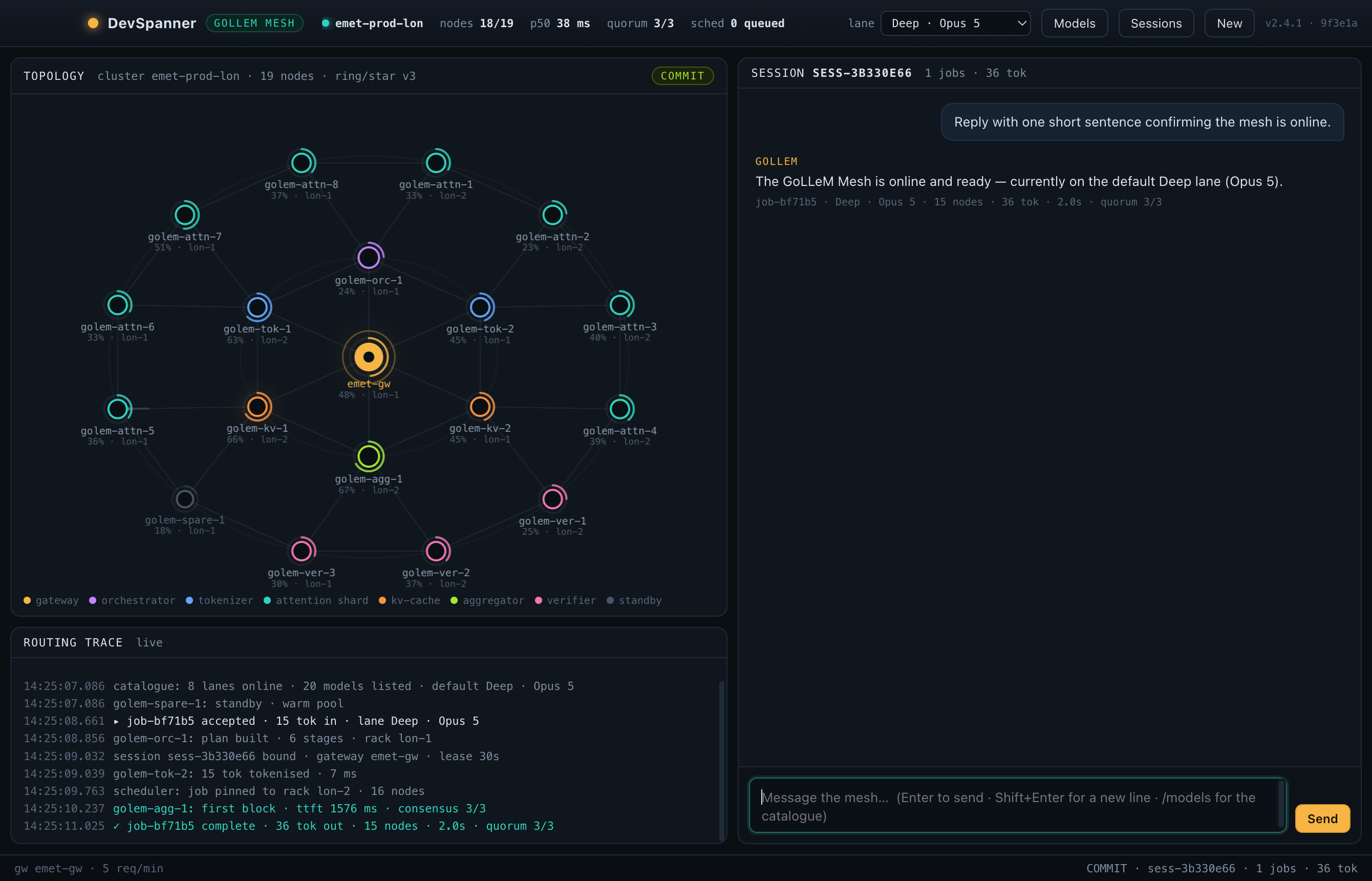
DevSpanner is a desktop app. Pick a lane, ask, and watch the job run: the conversation and the routing trace on one screen, with the mesh view beside them when you want it. Until peer sharing opens, the mesh view shows a simulated network, so you can see how the swarm will behave.
Frontier models sit side by side as lanes, grouped by vendor. Switch lanes per message and keep the conversation going.
Browse every session on your machine across projects, open one read-only, and continue it in a safe fork. The original transcript is never touched.
A live trace shows which lane took each job, time to first token, token counts and the health of the mesh.
A frontier model manages; the mesh does the heavy lifting. The scheduler blends frontier, open-weight and categorisation models per task, always optimising for the best value for your work: only the manager's tokens are premium, cheap judgments gate the expensive compute, and tokens you have already paid for get reused. Every saving is shown per job in the trace, so you can see it rather than take it on trust.
Hand-offs send drafts, extraction and summaries to cheaper lanes while the frontier lane does the thinking. Cached and fractional tokens stop you paying twice for the same context.
betaRun a job on an open-weight lane, or pay with tokens your machine earned overnight, and there is no per-token bill at all. You pay with compute you already own.
in developmentEach job reports the lane, the tokens, what was handed off and what was shared, and the console keeps a running total per session.
shippedBeta targets from the DevSpanner beta lanes. Your savings depend on the mix of work; open-weight lanes run on hardware or hosting you provide, so compute costs still apply.
The console is the foundation. The point is a developer AI workbench with every lane and every tool in reach. Early-access members get each piece as it lands and shape what comes next.
shipped and beta run in the console today · preview means the console shows a simulated version while the real thing is built · in development, opening with the beta and planned are on the way
Frontier models side by side, grouped by vendor, switchable per message.
Every session on your machine, searchable, resumable, forked on continue.
Topology and routing trace, with the lane, timing and tokens for every job. The topology shows a simulated five-region network until peer sharing opens. Hidden by default; show it when you want to watch the swarm.
The manager keeps the thinking; the cheap parts of a job go to cheaper lanes. The trace says what was delegated and what share of tokens it took.
Questions, fixes and vibes answered in seconds on the lane you pick, routing shown, several sessions open at once.
Define, plan, run, verify, review. Several projects in flight, checkpointed, running overnight while you sleep.
The manager interviews you until goal, outputs, checks and constraints are nailed down, because a good brief is most of a good result.
Express, standard and overnight, priced in tokens, chosen per project and changeable per task.
Repeated context is served from cache at a fraction of the price, and every job shows the share it got from cache.
Typed judgments check project tasks before they count. A specialist intent gate in front of the expensive compute is in development.
The console knows node health, capacity and routing at the moment you ask, and can tell you. Today that's the simulated network.
Unhealthy nodes drop out, spares are promoted and saturated nodes shed load. You can watch it in the mesh view's simulation today; real rerouting arrives with peer sharing.
Frontier lanes through the gateway today, with open-weight lanes, custom builds and specialists added as they come online, each shown with its status.
Open-weight models split across peers in layer blocks: Llama 3.3 70B over eight peers, Qwen3.6-27B and Gemma 3 27B over three or four, gpt-oss-20b at the edge. Zero per-token cost. Frontier lanes are hosted through the gateway, not on the mesh.
In-house builds on open weights, starting from Qwen3.6-27B, tuned for your codebase and served as lanes.
Contribute idle hours on your schedule, sandboxed, with hard limits, and bank mesh tokens for every job served.
Enter your off-peak hours or pick a tariff, and your machines share only in the cheap windows.
Share when your solar or battery has spare, or when the grid's carbon intensity is low, using the public feed.
Add as many machines as you like to one account, each with its own schedule and limits, and see them all on one screen.
One wallet for the whole fleet: what each machine earned, what you spent by day, and the balance carried forward.
File, shell and browser tools run behind a permission card you can actually read. There is no bypass mode, by design.
Worker sessions run each task with fresh context, visible in the trace, allowed only the edits and commands the brief pre-approved.
Run open-weight models on your own hardware and route to them like any other lane.
Share a session or a fork with a colleague, with the routing trace intact.
Spend by lane, by project and by day, with the savings from hand-offs and shared tokens broken out.
We're onboarding developers in small batches while the tools work lands. Leave your email and we'll send an invite when your batch opens.